Use case
It's Monday morning. Seven recurring checks are due. Who knows?
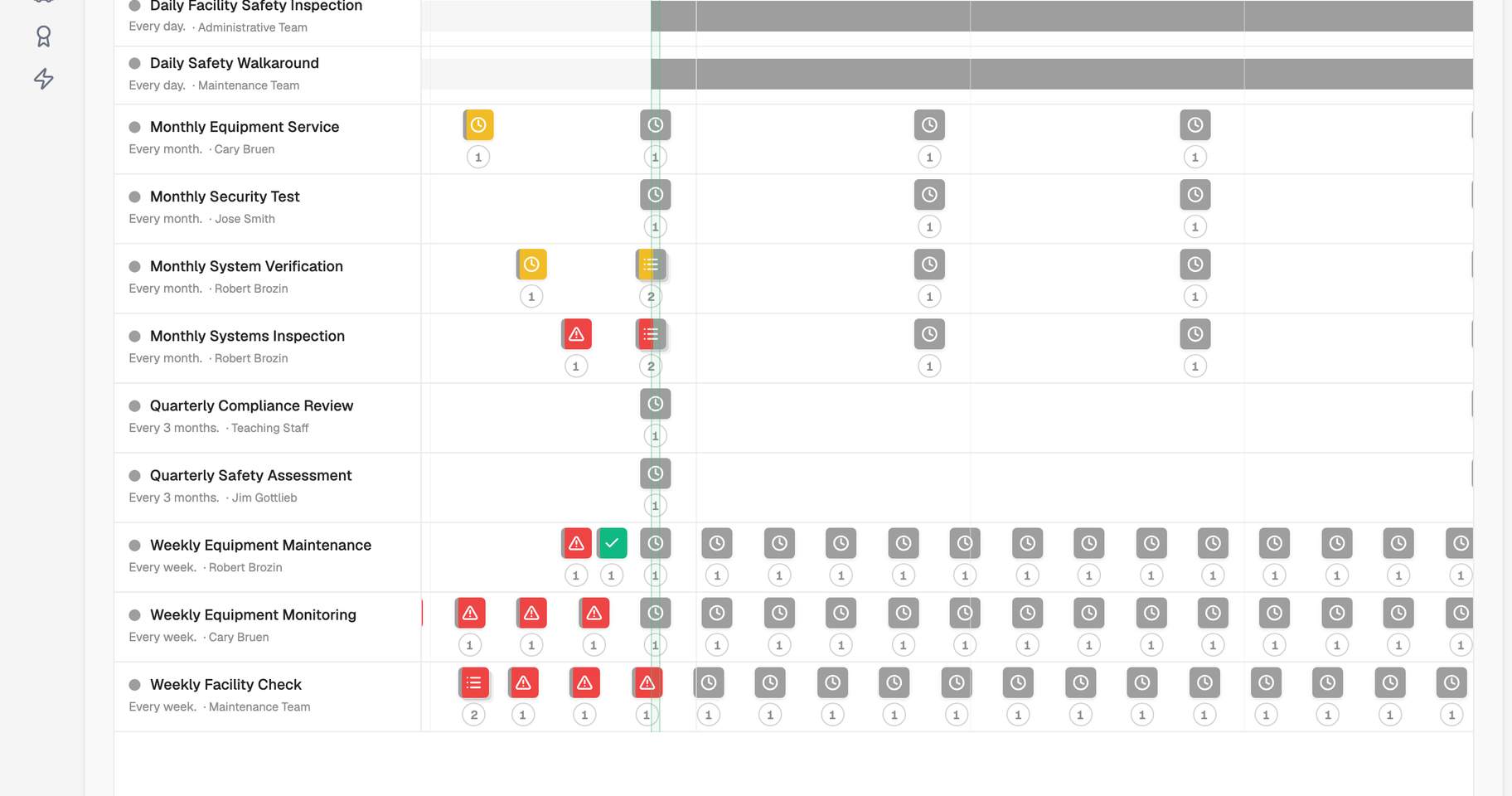
The weekly fire door check auto-generates in Maintenance & Scheduling with a checklist from Flexible Forms. The monthly legionella flush goes to someone else with a different checklist. Each is completed on mobile, the compliance record updates on submission, and the 52-week schedule shows whether you are on track.
Right now, scheduled checks depend on someone's memory and a clipboard that lives somewhere.
The weekly fire door inspection was supposed to happen on Friday. It didn't, because the caretaker was dealing with a burst pipe and nobody else knew it was their job. The monthly temperature log is in a paper folder in the kitchen. The quarterly lift inspection is due, or was it last month?
When something does get completed, there's a paper record somewhere. But paper records don't show you when a round is missed, or tell you at the end of the year how many checks were done versus how many were scheduled.
When an inspector asks whether your checks are being done consistently, 'yes, mostly' is a different answer to 'here's the 52-week completion record.'
See it in action
With modules connected, the workflow looks like this.
Auto-generated, auto-assigned
Recurring work orders generate themselves. No setup needed each time.
Set up the schedule once: fire door check, weekly, assigned to the caretaker, checklist attached. Every Monday morning, the work order generates automatically and appears in their queue. The same for the monthly legionella flush, the quarterly lift inspection, the daily temperature log: each auto-generates on schedule, assigned to the right person, with the right checklist attached.
- Set once. Runs every time.
- Configure the schedule, assign the person, attach the checklist. The system generates the work order on schedule without any further input.
- Right person, right checklist.
- Different recurring tasks can go to different people, each with their own checklist.
- 52-week schedule in one view.
- See every scheduled task across the full year. Know what's coming before it's due.


Completed on mobile
Checks completed on a phone. Record updated in real time.
The caretaker opens their inbox, sees the fire door check is due, and works through the checklist on their phone. Each door is checked, photos attached where needed, notes added. When they submit, the work order closes and the compliance record updates automatically. No paper to file, no manual entry later. The record is live the moment the last item is ticked.
- Completed on any mobile device.
- No app to download, no paper forms. Works on any phone on any site.
- Photos and notes attached in the moment.
- Evidence captured where the work is done, linked directly to the work order.
- Compliance record updates instantly on submission.
- The moment it's done, it's logged. No manual entry, no delay, no gap.

Missed checks visible immediately
If someone misses a round, it shows. Before anyone has to ask.
If the weekly fire door check wasn't completed by end of Friday, it's flagged on the dashboard and stays in the assigned person's inbox until it's done. The 52-week completion view shows the full pattern, not just this week but every week. When an inspector asks whether your checks are being done consistently, you show them the record.
- Missed checks flagged automatically.
- Overdue work orders appear on the dashboard and stay in the assignee's inbox until completed.
- Full completion history at a glance.
- The 52-week record shows every task completed, missed, or cancelled across all schedules.
- Compliance patterns visible, not just individual tasks.
- See trends across weeks, sites, and task types. Know whether you're truly on track.

Scheduled work runs through Maintenance & Scheduling to auto-generate the work, Flexible Forms for the checklists, Premises & Asset Management to link tasks to locations and assets, and Standards to show whether you're meeting the requirement.
Free readiness check
Could you prove it tomorrow?
Most teams only find the gaps when someone asks. This finds them first: a readiness score, your biggest gaps, and a plan for each, in about three minutes.
Across sectors
This workflow works the same way everywhere.
The details change depending on your world.
Education
Fire door checks, playground inspections, fridge temperature logs: all scheduled, auto-assigned, and completed on mobile. Annual completion record ready for any inspection.
Offices & Workplaces
Fire door checks, DSE reviews, and water monitoring scheduled per floor and tenant. Completion logged against the site, so every workplace duty stays current without chasing spreadsheets.
Charities & Children's Services
Site safety checks, vehicle inspections, and session set-up routines: scheduled across youth centres and outreach venues, completed on mobile, and logged for trustees and funders.
Care Homes
Medication round documentation, room temperature checks, equipment inspections: scheduled by role and shift, completed on mobile, and logged automatically into the compliance evidence record.
Facilities Management
PPM schedules, contractor-led inspections, client site checks: all tracked in one system. Completion rates visible for client reporting. Missed checks flagged immediately.
Manufacturing & Warehousing
Machine safety checks, calibration schedules, environmental monitoring: recurring tasks assigned to operators, completed on the floor, logged in real time. H&S evidence always current.
Leisure & Hospitality
Pool water testing, gym equipment inspections, fire safety checks: daily, weekly, and seasonal tasks all scheduled and tracked. Public liability evidence built in.
Construction & Installation
Plant pre-use checks, toolbox inspections, and site safety walks: recurring tasks assigned to crews, completed on mobile, and logged against the job.
Keep exploring
Related use cases
The same connected workflows, applied to the situations that sit alongside this one.
Someone spots a problem
Recurring maintenance catches some issues; people catch the rest. See how a reported hazard becomes a connected record, with repeat patterns surfacing against the asset.
See use caseAre we meeting the standard?
Completed checks are the evidence a standard reads from. See how scheduled work feeds a live, site-by-site view of whether each requirement is met.
See use caseA contractor turns up on site
Planned work is often contractor work. See how their documents, induction, and sign-in are captured against the job before they start.
See use caseExplore the platform

See it for yourself.
Book a demo and we'll build your recurring schedule in the system so you can see what Monday morning looks like when everything's automated.