CAFM Software

A CAFM system should hold your estate structure, asset register, planned maintenance and reactive work orders — and leave an audit trail on every job. CalmCompliance connects the physical layer on Operate with compliance records on Govern, so CAFM is not just scheduling without proof.

Try it Free

What a CAFM system does

CAFM software built around assets, schedules and proof

Buyers searching for CAFM software or CAFM systems in the UK want more than a wall planner. They need structured locations, a trustworthy asset register, PPM that runs itself and work orders that close with evidence — across every site in the portfolio.

What is CAFM software?

CAFM software (computer-aided facilities management) is the system that holds your estate structure, asset register, planned maintenance and reactive work orders so facilities teams can run buildings without relying on wall planners and inbox chasing. People also search for a CAFM system or CAFM tool when they want that same operational picture: where every asset sits, what is due this week, who is working on it, and what proof exists when a client or auditor asks. Strong CAFM software answers those questions from the work itself — not from a spreadsheet that drifted out of date between sites.

  • Estate hierarchy and asset register in one place
  • Planned and reactive work on the same calendar
  • Inspections and statutory checks logged on assets
  • A clear answer to what was done, where and when
CAFM software and CAFM system overview across an estate

CAFM software vs a compliance operations platform

Traditional CAFM software focuses on scheduling and assets. A compliance operations platform connects that physical layer to policies, risk assessments, training and acknowledgements so maintenance work leaves an audit trail. CalmCompliance is CAFM software on Operate with Govern and Manage alongside it — so a completed PPM job, a failed inspection and the linked risk assessment sit on one record instead of three tools that never talk.

  • CAFM scheduling without losing compliance proof
  • Risk assessments acknowledged on the work order
  • Policies and people records next to the estate
  • One platform instead of CAFM plus a separate GRC tool
CAFM software connected to compliance records in CalmCompliance

Estate and asset structure

Model sites, buildings, floors and rooms the way your portfolio exists on the ground. Every asset sits in the hierarchy it belongs to, so a CAFM system answers where something is, what it needs and what has happened to it — without a spreadsheet that drifts out of date.

  • Sites, buildings, floors and rooms in one tree
  • Asset register tied to exact locations
  • QR-linked assets for field access
  • Scales from one site to a large portfolio
CAFM software showing site hierarchy and asset register across an estate

Asset and PPM data model walkthrough

In CalmCompliance CAFM software, every location sits in a site → building → floor → room hierarchy. Assets hang off that tree with the fields teams actually use — warranties, suppliers, insurance and files — and planned maintenance schedules generate work against the right asset. Reactive work orders sit alongside PPM; inspections log results on the same record. The 52-week planner shows the combined load so a CAFM tool is not just a job list but a living model of the estate.

  • Hierarchy that matches how the estate is run
  • Schedules that generate jobs on cadence
  • Planned and reactive work against the same assets
  • History retained on the asset timeline
CAFM asset and PPM data model with 52-week planner

Planned maintenance and PPM

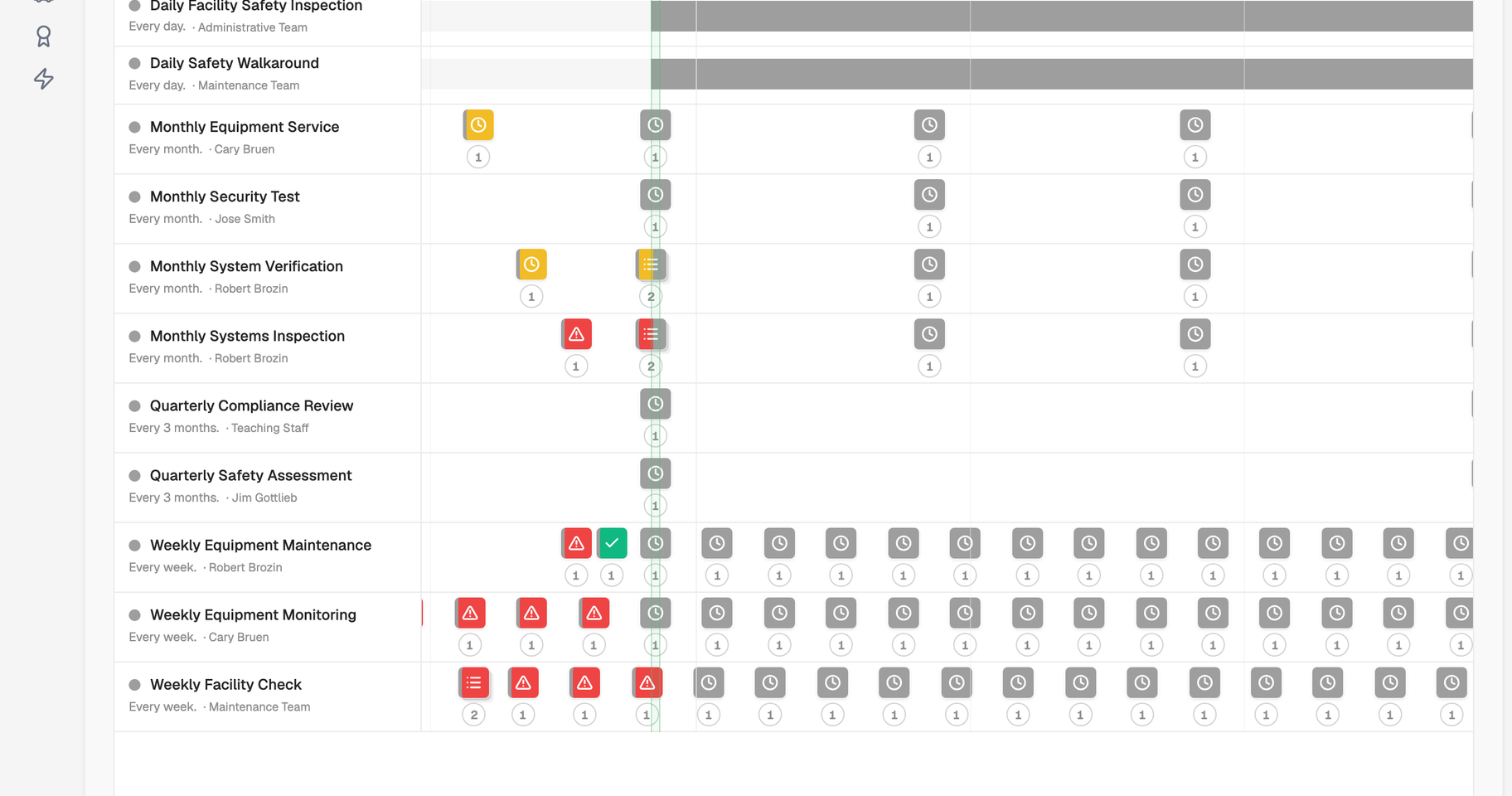
Set recurring maintenance schedules and let jobs generate on the right cadence. A 52-week planner shows everything due across the operation, so CAFM software replaces wall planners and calendar invites with one view of statutory and routine work.

  • Recurring PPM schedules by asset and location
  • 52-week cross-schedule planner
  • AI-assisted schedule creation from a prompt
  • Statutory and routine work in one system
CAFM planned maintenance 52-week planner across multiple sites

Work orders and reactive jobs

Raise work orders the moment reactive work appears and track each one through to completion. Planned and reactive jobs sit side by side in the CAFM system, with risk assessments acknowledged on the job where required.

  • Reactive jobs captured against the right asset
  • Status tracked from raised to complete
  • Planned and reactive workload in one view
  • Risk assessment linked to the work order
CAFM work order detail with status and assignment

Inspections and statutory checks

Schedule recurring inspections and capture results in a consistent form every time. Because each check logs against the place or asset it covers, CAFM software builds the compliance history clients and auditors expect.

  • Recurring inspections tied to locations and assets
  • Mobile capture on site
  • Results stored on the asset record
  • Defensible history of every check completed
CAFM inspection checklist completed on a mobile device

A logged record of every job

Every completed job leaves a permanent record tied to the location or asset involved. When a facilities client or auditor asks what has been done, CAFM software answers from the work itself — not a reconstruction after the fact.

  • Completion dates and outcomes captured as you go
  • Cost, parts and labour on work orders
  • Activity timeline on every asset
  • Proof ready for client reviews and audits
CAFM completed job history on an asset timeline

Migrating from an incumbent CAFM system

Teams leave legacy CAFM software when the tool schedules work but cannot prove compliance, or when multi-site rollups still need spreadsheets. Migration usually means exporting the asset register and open schedules, mapping locations into CalmCompliance's hierarchy, importing assets, then rebuilding PPM cadences against the live estate. Start with one pilot site, confirm engineers can close jobs on mobile with evidence attached, then cut over the remaining portfolio once the data model is trusted.

  • Import assets and locations from incumbent exports
  • Rebuild PPM against the live hierarchy
  • Pilot one site before portfolio cutover
  • Keep compliance evidence linked from day one
Migrating estate data into CalmCompliance CAFM software

Free readiness check

Could you prove it tomorrow?

Most teams only find the gaps when someone asks. This finds them first: a readiness score, your biggest gaps, and a plan for each, in about three minutes.

CAFM software questions answered.

Common questions about CAFM software, CAFM systems and how CalmCompliance fits.

See CAFM on your estate

Walk through assets, PPM and work orders on a live demo.

Ready to run CAFM with compliance built in?

Try it free on Operate, or book a demo to see assets, PPM and work orders connected to the compliance layer.

Try it Free
CalmCompliance CAFM dashboard showing maintenance and asset management